¶ System Settings
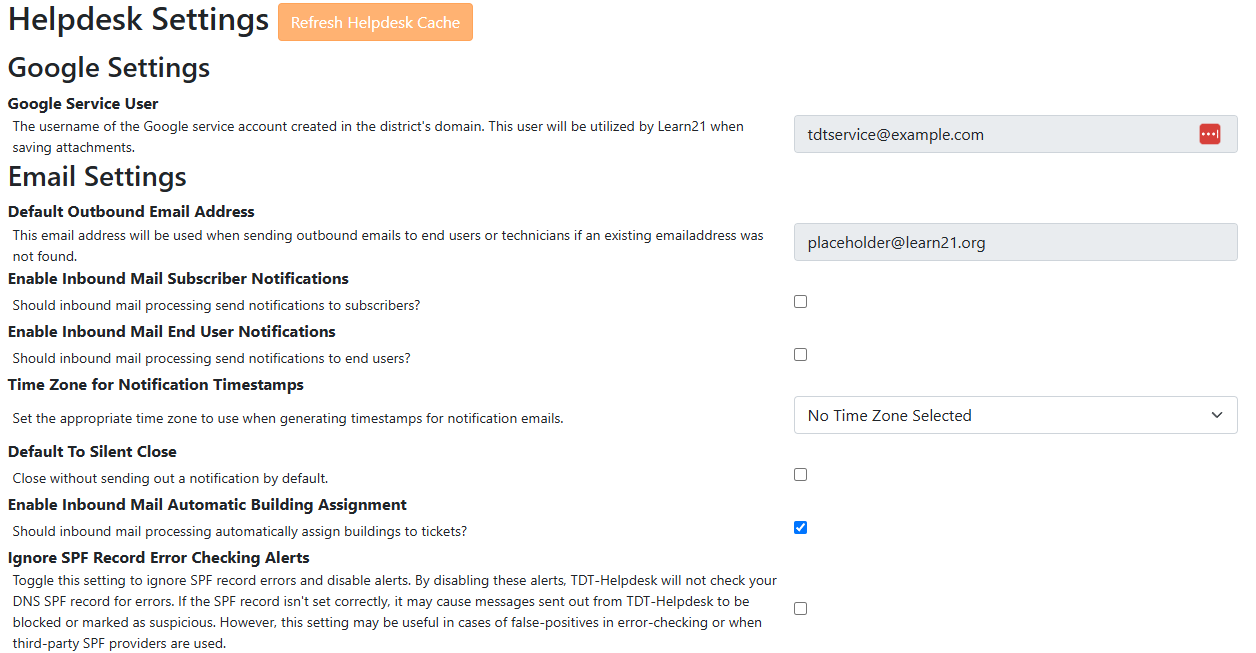
¶ Helpdesk settings
The Helpdesk Settings page contains system‑wide configuration options. A Google service user can be configured to store attachments in Google Drive; if Microsoft OneDrive is used, this field is left blank. You can also specify a backup email address used when regular mail processing fails.
Email notification toggles allow you to choose whether technicians and end users receive emails for events such as ticket creation and replies. Use the time‑zone selector to ensure notifications display correct timestamps. Enabling Default to Silent Close closes tickets without sending a “Ticket Closed” email.
If your Student Information System (SIS) is connected to TDT‑Helpdesk, the system can automatically assign the ticket’s building based on the end user’s primary building.
If an end user belongs to multiple buildings, only the primary building is used for automatic assignment. You can edit the building after submission if needed.
¶ Mail deliverability
To help deliver outbound email, TDT‑Helpdesk provides a custom SPF entry. Add this line to your domain’s SPF record to prevent messages being blocked.
include:mailrelay.learn21.org
Having multiple SPF records in your DNS will break mail processing. Add our custom line to your existing SPF record instead of creating a separate record. If you do not have an SPF record, create one before adding the line.
¶ End‑user portal
When enabled, the End‑User Portal allows staff and students to sign in via single sign‑on (SSO) to create and view their tickets. The portal is primarily for ticket submission; all correspondence and updates are still delivered via email. Only users from approved district domains can access the portal.
To allow users from additional domains (for example,
@stu.example.edu) to access the portal, contact support so the domain can be whitelisted.
¶ Portal settings
Portal customization options let you add a logo and configure the Help button. The Help button can link to an external knowledge base, Google Form, phone number or other resource. You can set a feedback message and the link text that appears when users click the button.